

A 2020 Toyota Corolla can suit work travel when the particular car is comfortable for you, supports the phone functions you rely on and has clear maintenance records. If your day includes a client visit, a return to the office and another appointment, easy trip preparation and predictable servicing commitments matter to the purchase. The Corolla name alone does not establish a used car's condition or compatibility with your phone.
Identify the Corolla before paying for equipment you cannot use
Ask for the model year, original supply market, trim, engine and transmission, then match them to the documents and distributor information for the VIN. Establish whether the multimedia unit is original or a replacement. An aftermarket screen does not automatically validate the advertised specification, and its operation and support may differ from the original system.
Toyota Canada's 2020 Corolla sedan release describes the twelfth generation and lists Apple CarPlay compatibility, Bluetooth and USB connectivity. It concerns the Canadian market and does not prove the equipment of a Gulf-market car or every import. Test the required function in the actual car rather than transferring app or connected-service promises from another market.
Test your work phone while parked
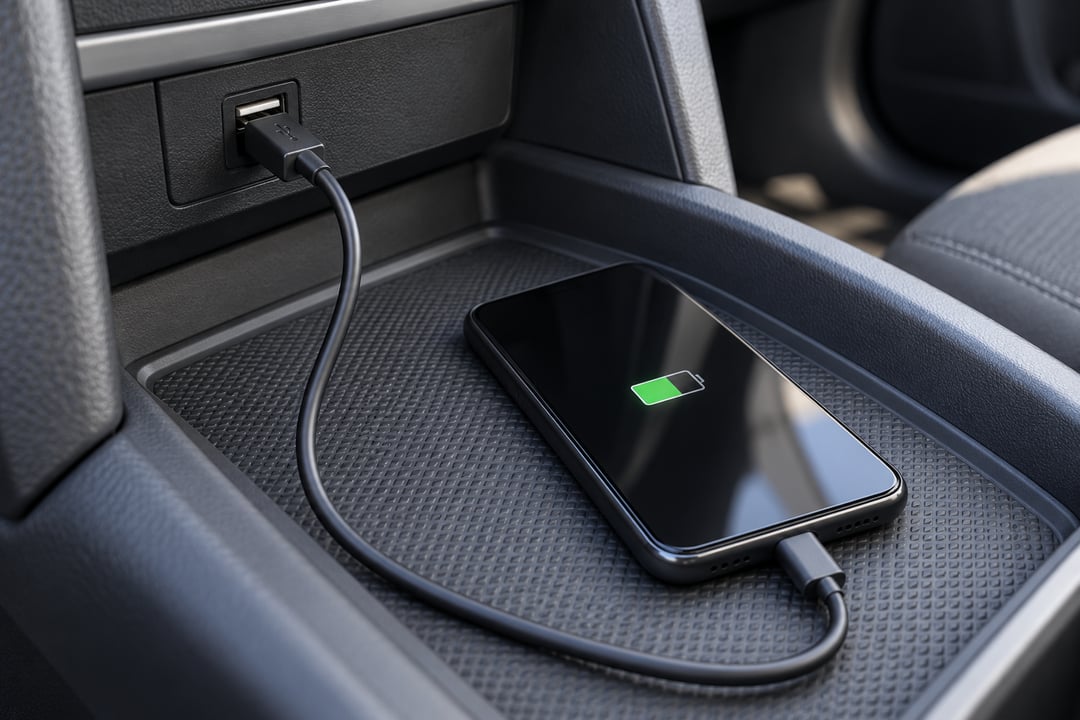
Bring your own phone and the cable you intend to use. Start with charging, then test audio, navigation and screen integration separately. A charging symbol does not confirm that maps will appear on the car's screen, and successful Bluetooth pairing does not establish CarPlay or Android Auto support.
Apple's CarPlay setup guidance distinguishes between supported wired and wireless connections and directs wired users to the appropriate vehicle USB port. Follow the vehicle system and phone instructions. A USB socket or model-year label does not establish wireless support.
- Check that the plug seats securely and the port and cable work with your phone, without pulling or forcing the connector.
- Load a trial route and assess screen visibility and audible directions while stationary. Set your destination before driving.
- With the other person's permission, try a short call while parked to assess the microphone and speakers. Avoid syncing client contacts during the viewing.
- Disconnect and reconnect the phone and check how you return to the functions you need. Remove your pairing and any data added after the trial.
If connection fails, try a suitable known-good cable and check system compatibility before ordering a screen repair. The failure needs investigation: it may involve the phone, cable, settings or vehicle unit. A promise that an update will solve it needs confirmation of compatibility and cost.
Try your working day, not just the cabin space
Adjust the seat, wheel and mirrors to a comfortable position and check parking visibility and access to climate controls. Try entry and exit as you would during repeated visits. If you regularly bring a colleague, let them try the seat they will use rather than inferring their comfort from the driver's experience.
Bring your normal laptop bag or demonstration samples to check loading and safe securing, keeping objects away from pedals and airbag deployment areas. Assess whether your everyday arrangement leaves comfortable passenger space. Try direct visibility and the fitted camera or sensors during a safe, authorised parking manoeuvre instead of assuming the car suits every narrow bay.
Run the air conditioning and check airflow, windows, locks and lights. During a drive permitted by the seller, note unusual vibration, noise or response delays. Those observations alone do not diagnose internal faults or remaining component life. Obtain appropriate diagnosis when an observation warrants it.
Price interruptions using your actual circumstances
Request maintenance invoices and a sequence of recorded odometer readings, then establish what is due soon using the correct version's manual and history. Ask about previous use and repairs and compare the answers with available documents and observations. There is no fixed timing-chain, brake or steering failure mileage in this assessment, or a guaranteed resale percentage.
For work use, budget the purchase price, servicing due and written repair quotations together. Then obtain practical information about workshop booking time, parts availability and alternative transport if needed. Use a real alternative-transport quote and the workshop's realistic timing instead of assigning every lost working day a standard invented cost. Identify a colleague who could cover a visit or a way to reschedule when necessary; this is an operating plan, not a guarantee against breakdown.
The offered Corolla makes a stronger case when your essential functions work during the trial, seating and loading suit you, and its records and servicing commitments are clear. Resolve an unproven essential feature or an unexplained observation, including its cost, before agreeing the purchase.
An experienced AutoFay inspector comes to the vehicle for a visual, non-intrusive, non-mechanical inspection, with computer diagnostics and functional observations according to the package and available conditions. This does not include dismantling parts or examining internal engine or transmission components. Some observations need workshop diagnosis; an inspection does not guarantee detection of every fault or prevent future failures. Review the available inspection packages before booking.
Prepared by AutoFay. Editorial update: October 28, 2026.


0 Comments
No comments yet. Be the first to share your thoughts!